Deepdive
(Advertisement)


What Is Pi Wallet: Explore How It Works, How to Get Started, and More
Pi Wallet is a non-custodial Pi Network wallet explaining access, setup, security, transactions, and management within the Pi ecosystem.

BSCN
January 16, 2026

(Advertisement)
Table of Contents
Pi Wallet allows registered members, known as Pioneers, to securely store, send, and receive PI, the network’s native cryptocurrency. The wallet is accessed exclusively through the Pi Browser, and it places full responsibility for asset control in the user's hands through private key ownership rather than custodial management.
This article explains what Pi Wallet is, how it works at a technical level, and how to use it step by step. It also covers wallet creation, security practices, transaction handling, and common issues users encounter. In essence, the goal is to provide a clear, practical guide for anyone looking to understand or actively use Pi Wallet within the Pi Network ecosystem.
What Is Pi Wallet?
Pi Wallet is a non-custodial cryptocurrency wallet developed by the Pi Network core team. Non-custodial means that users, not Pi Network, control their private keys and wallet access. The wallet is designed specifically for PI and is tightly integrated into the Pi Network ecosystem rather than operating as a general-purpose, multi-chain wallet.
As every Pioneer knows, the Pi Network itself launched in 2019 and was founded by Stanford graduates Nicolas Kokkalis and Chengdiao Fan. The platform’s core objective is to make cryptocurrency participation accessible through mobile devices without requiring specialized hardware or high energy consumption.
As of January 2026, Pi Network reports more than 70 million registered users globally, and approximately 14.8 million verified Mainnet accounts. Pi Wallet became a central component of the network following the Open Mainnet launch on February 20, 2025, which enabled external connectivity beyond Pi’s previously enclosed environment.
How Pi Wallet Fits Into the Pi Network Ecosystem
Pi Wallet does not operate as a standalone application. It functions as part of a broader system that includes the Pi Network mining app used for daily PI mining, Pi Browser for wallet access and decentralized applications, and the Pi blockchain, which records transactions and balances.
Access to the wallet is intentionally restricted to Pi Browser to reduce phishing risks and maintain ecosystem consistency. This design choice ensures that wallet activity, decentralized applications, and payments all operate under the same authentication and security framework.
Pi Wallet supports both Testnet and Mainnet environments. Testnet allows users to practice transactions with simulated Test PI, while Mainnet handles real PI balances. Most importantly, mainnet access requires Know Your Customer (KYC) verification, a key component of the Pi Network ecosystem.
How Pi Wallet Works: Technical Overview
Blockchain and Consensus Mechanism
Pi Wallet runs on the Pi blockchain, which uses the Stellar Consensus Protocol. This protocol replaces energy-intensive mining with trust-based validation.
Instead of miners competing to solve cryptographic puzzles, Pi Network relies on security circles to verify transactions. Each user selects three to five trusted contacts. These overlapping trust relationships form a global trust graph that the network uses to validate transactions.
This approach allows the network to maintain low energy usage, operate efficiently on mobile devices, and avoid centralized transaction validation. Private keys for Pi Wallet are generated locally on the user’s device and are never stored on Pi Network servers.
Wallet Architecture and Access
Pi Wallet is embedded within Pi Browser. Users authenticate using either a 24-word passphrase or biometric authentication (such as fingerprint recognition), if enabled.
The wallet generates a unique public address for receiving PI and a corresponding private key derived from the passphrase. Losing the passphrase permanently removes access to the wallet.
Testnet and Mainnet Operation
Pi Wallet operates in two modes. Testnet is used for learning and testing transactions without financial risk. Mainnet handles real PI tokens and requires completed KYC.
Balances mined through the Pi Network app migrate to Mainnet once KYC requirements are met and checklist steps are completed.
How to Access Your Pi Wallet
Accessing Pi Wallet is straightforward:
- Download Pi Browser from the Apple App Store or Google Play Store.
- Open Pi Browser and sign in using your Pi Network credentials.
- Tap the Wallet icon on the Pi Browser homepage.
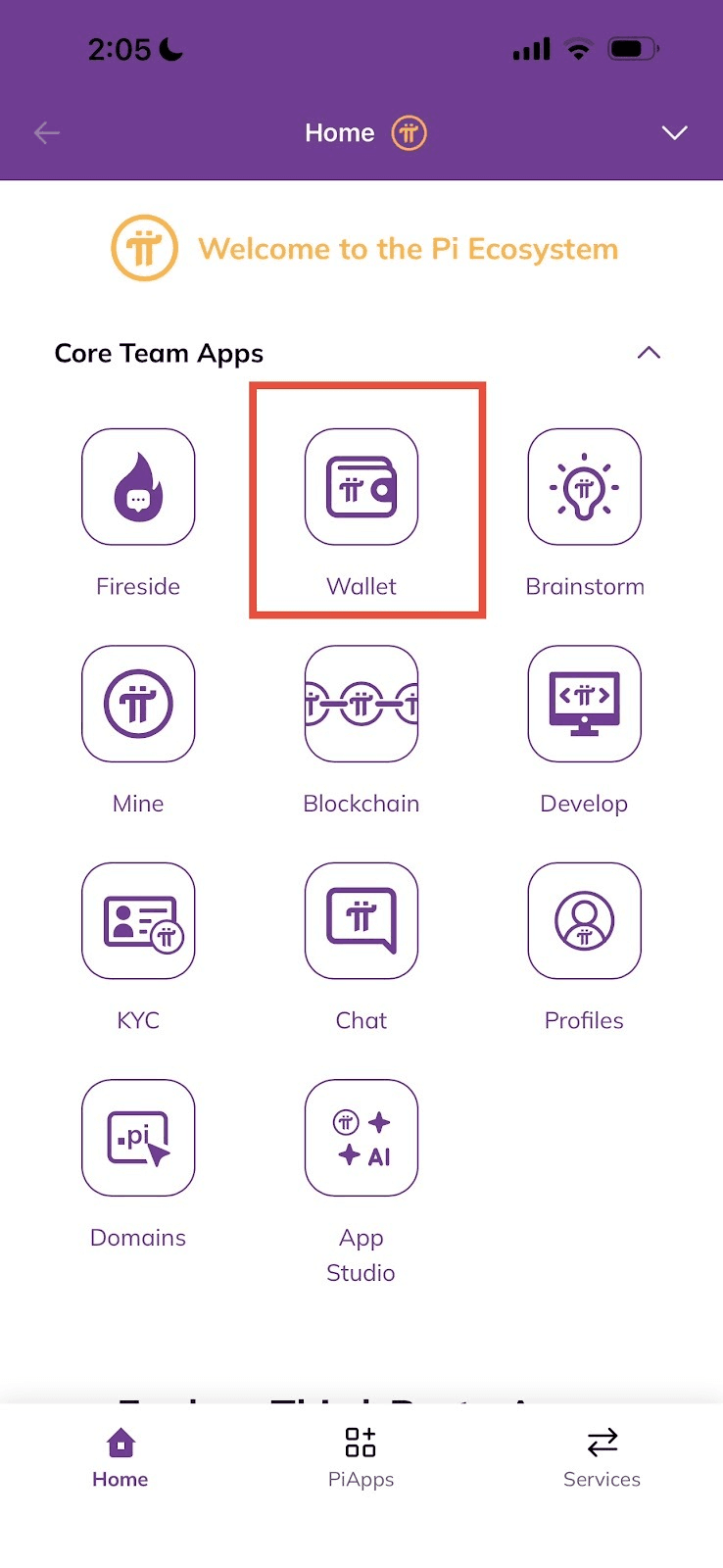
- Sign in using your 24-word passphrase or biometric authentication.
It is worth noting that there is no web-based login outside Pi Browser. Attempts to access Pi Wallet outside its official channels should be treated as potential scams.
How to Create a Pi Wallet
- Open Pi Browser and tap Wallet.
- Select Generate New Wallet.
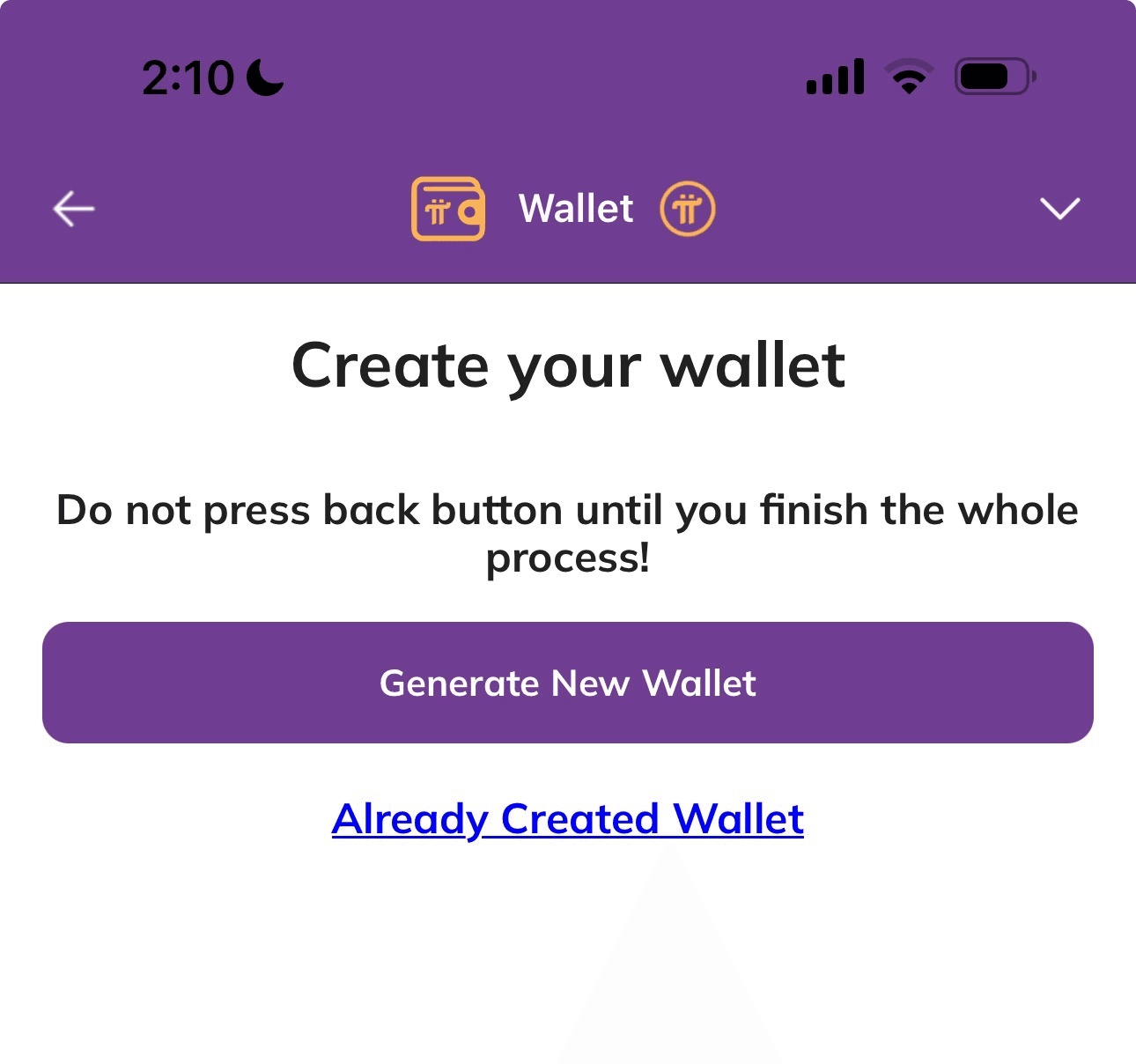
- A 24-word passphrase will be displayed once.
- Write the passphrase down and store it offline.
- Confirm the passphrase when prompted.
- Once confirmed, the wallet becomes active and ready for Testnet or Mainnet use, depending on account status.
What to Do If You Lose Your Passphrase
If you lose your passphrase, you permanently lose access to that wallet. Pi Network cannot recover it, and you must generate a new wallet. This is a core characteristic of non-custodial wallets, placing full responsibility on the user.
Troubleshooting Common Wallet Errors
Users may occasionally see messages such as an unexpected error occurred, Pi wallet currently inaccessible, or wallet error, try again later. These errors are typically caused by weak or unstable internet connections or temporary maintenance on Pi Network services. In most cases, waiting and trying again later resolves the issue.
Sending and Receiving PI Using Pi Wallet
To send PI:
- Open the Pi mainnet or testnet interface
- Select Pay/Request Icon
- Choose to either scan the QR code or manually add the wallet address
- If you have the address, enter it, specify the amount of Pi to send, and add the optional memo, then click send.
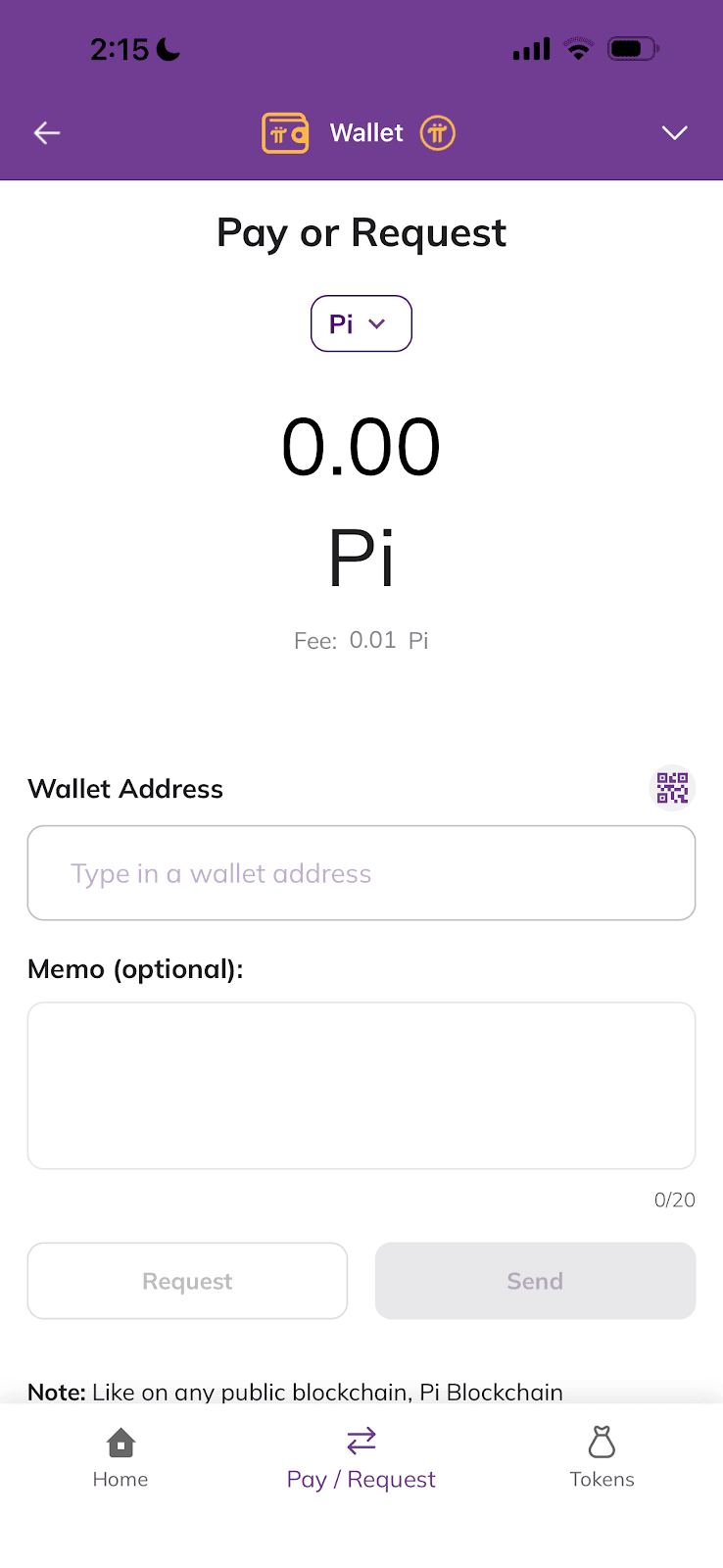
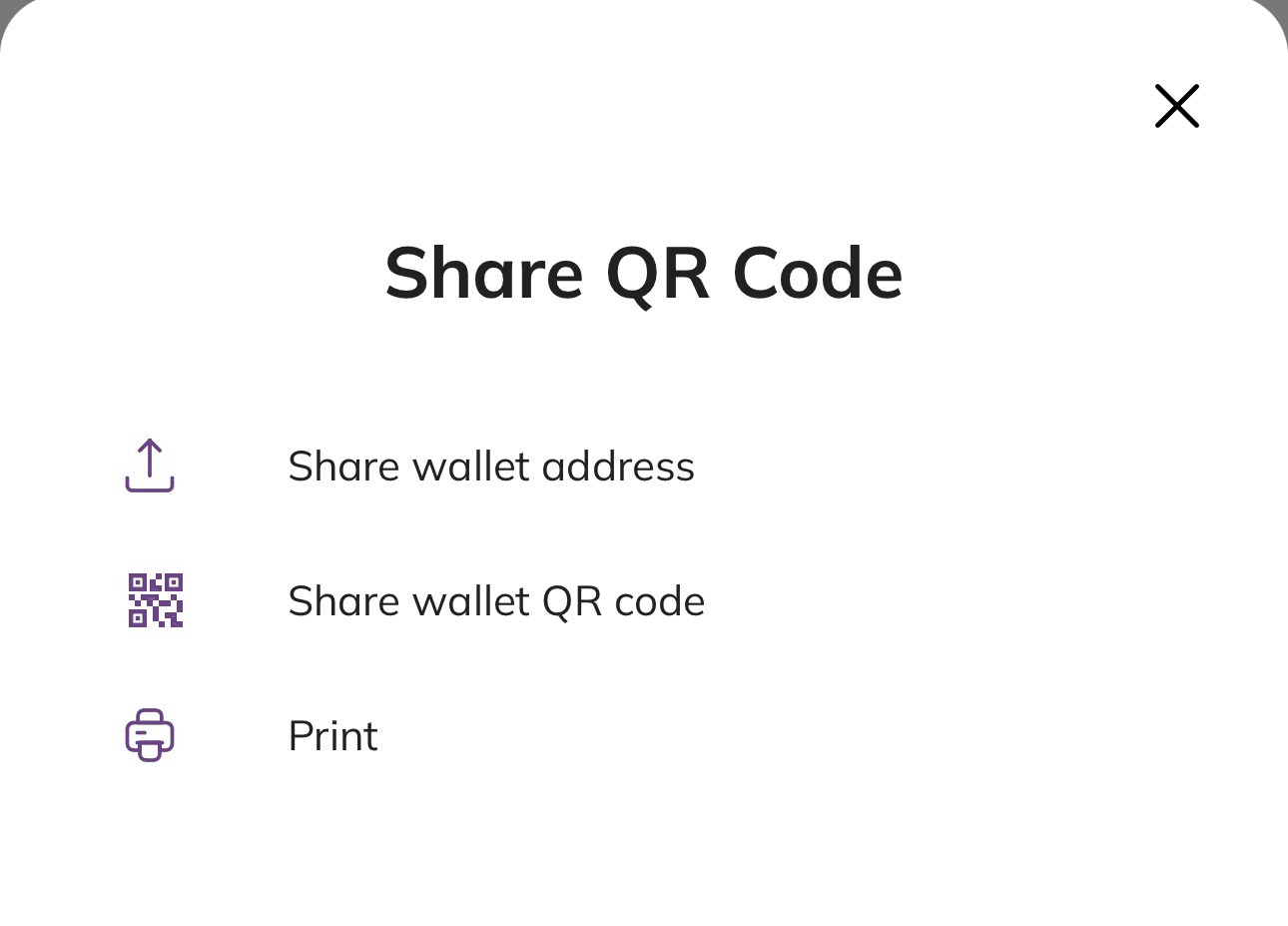
To receive PI, follow the same steps as above, but this time click Scan or Show QR Code, then select the share icon to send your wallet address or QR Code to the user who wants to send you PI.
Security Best Practices for Pi Wallet
- Never share your passphrase or private keys.
- Store your passphrase offline on paper.
- Avoid accessing your wallet on public Wi Fi networks.
- Only install apps from official app stores.
- Keep Pi Browser and the Pi Network app updated.
Conclusion
Pi Wallet is a purpose-built, non-custodial wallet designed to support Pi Network’s mobile-first blockchain. It provides secure key ownership, integrated access through Pi Browser, and direct participation in the Pi ecosystem, from peer-to-peer transfers to real-world commerce. Its design emphasizes accessibility, energy efficiency, and user responsibility rather than custodial convenience.
For Pi Network participants, understanding how Pi Wallet works and how to use it securely is essential for managing PI on the network’s Open Mainnet.
Sources:
- Pi Browser: Explore Application
- Pi Network FAQs: How to Create and Use the Pi Wallet
- Pi Developer Guide: Introducing the Pi Wallet
Read Next...





Frequently Asked Questions
What app do I need to access Pi Wallet?
Pi Wallet can only be accessed through the Pi Browser app using Pi Network credentials.
Can Pi Network recover my wallet if I lose my passphrase?
No. Lost passphrases cannot be recovered, and access to the wallet is permanently lost.
Do I need KYC to use Pi Wallet?
KYC is required to use Mainnet features and transfer real PI, but Testnet access is available without it.
Can You Change Your Pi Wallet or Wallet Address?
You cannot modify an existing Pi Wallet or its address. You can, however, generate a new wallet.
Can You Change a Pi Wallet Passphrase?
user passphrases, and there is no recovery mechanism. If a passphrase is lost, the only option is to create a new wallet.
Disclaimer
Disclaimer: The views expressed in this article do not necessarily represent the views of BSCN. The information provided in this article is for educational and entertainment purposes only and should not be construed as investment advice, or advice of any kind. BSCN assumes no responsibility for any investment decisions made based on the information provided in this article. If you believe that the article should be amended, please reach out to the BSCN team by emailing [email protected].
(Advertisement)
Latest News
0h : 24m ago

What Is Jimothy Memecoin?
3h : 24m ago

What Is the Cardano Van Rossem Upgrade?
July 20, 2026

How Does Pump.Fun Make Money?
July 20, 2026

A Closer Look at Avalanche's 2026 Fundamentals
July 20, 2026

How Does Chainlink Verify That Tokenized Gold Is Backed by Real Gold?
July 17, 2026

What is the Nakamoto Coefficient & Why Does it Matter?
July 17, 2026

How to Trade on Robinhood Chain, Crypto's Busiest New Memecoin Market
July 17, 2026

Insights from CoinGecko's Q2 Crypto Report
(Advertisement)

Crypto Project & Token Reviews
Project & Token Reviews
Comprehensive reviews of crypto's most interesting projects and assets
Learn about the hottest projects & tokens

Latest Crypto Articles
Get up to date with the latest crypto news stories and events