Research
(Advertisement)


How Does Pi Network's New Payment Integration Actually Work? Step-by-Step Guide

Step-by-Step guide on how to integrate test Pi payments within apps in the Pi App Studio.

UC Hope
January 23, 2026

(Advertisement)
Table of Contents
As reported in our last Pi article, the latest update to Pi App Studio introduces in-app payment integration that allows creators to accept Pi-based payments without writing code. The feature is currently live on Testnet using Test Pi and is designed to simplify the embedding of payments into apps built in the Pi ecosystem. This article explains how the integration works, what it currently supports, and what creators need to know before using it.
The focus is on operational details rather than promotion. All descriptions below reflect the current Testnet implementation and documented walkthrough obtained from the protocol’s YouTube video.
What Changed With the New Payment Integration?
On January 21, 2026, Pi App Studio introduced built-in payment integration for newly created apps. The feature allows creators to add Pi-based payments inside their app experience using guided prompts rather than code.
Key characteristics of the update include
• Payments currently use Test Pi on Testnet
• Payments apply only during a single active session
• Integration is only available for newly created apps
• The feature is accessed through the Pi Browser, not Pi Desktop
This update does not enable persistent purchases that carry across sessions. It focuses on session-level interactions, such as continuing a game round or unlocking features during active use.
Why Payment Integration Matters Inside Pi App Studio
Before this update, integrating Pi payments required developer tools and technical knowledge, even with the reduced ten-minute developer library. That process remained inaccessible for non-technical users.
Pi App Studio now abstracts payment complexity into guided steps handled by AI. This allows creators without coding skills to
• Accept Pi payments
• Control pricing and placement
• Track revenue
• Own the monetization flow of their apps
From an ecosystem perspective, this reduces reliance on a small group of developers and enables more contributors to create utility-driven applications.
How Does Pi App Studio Payment Integration Work?
Session-Based Payment Model
As stated previously, Payments in Pi App Studio are session-based. A session is defined as one self-contained instance of activity, such as
• A game round
• A task attempt
• A single experience flow
Payments allow users to modify or extend that session without resetting progress. Once the session ends, the payment effect is no longer active.
This design avoids complex state management and keeps Testnet experimentation controlled.
Step-by-Step Guide to Adding Pi Payments
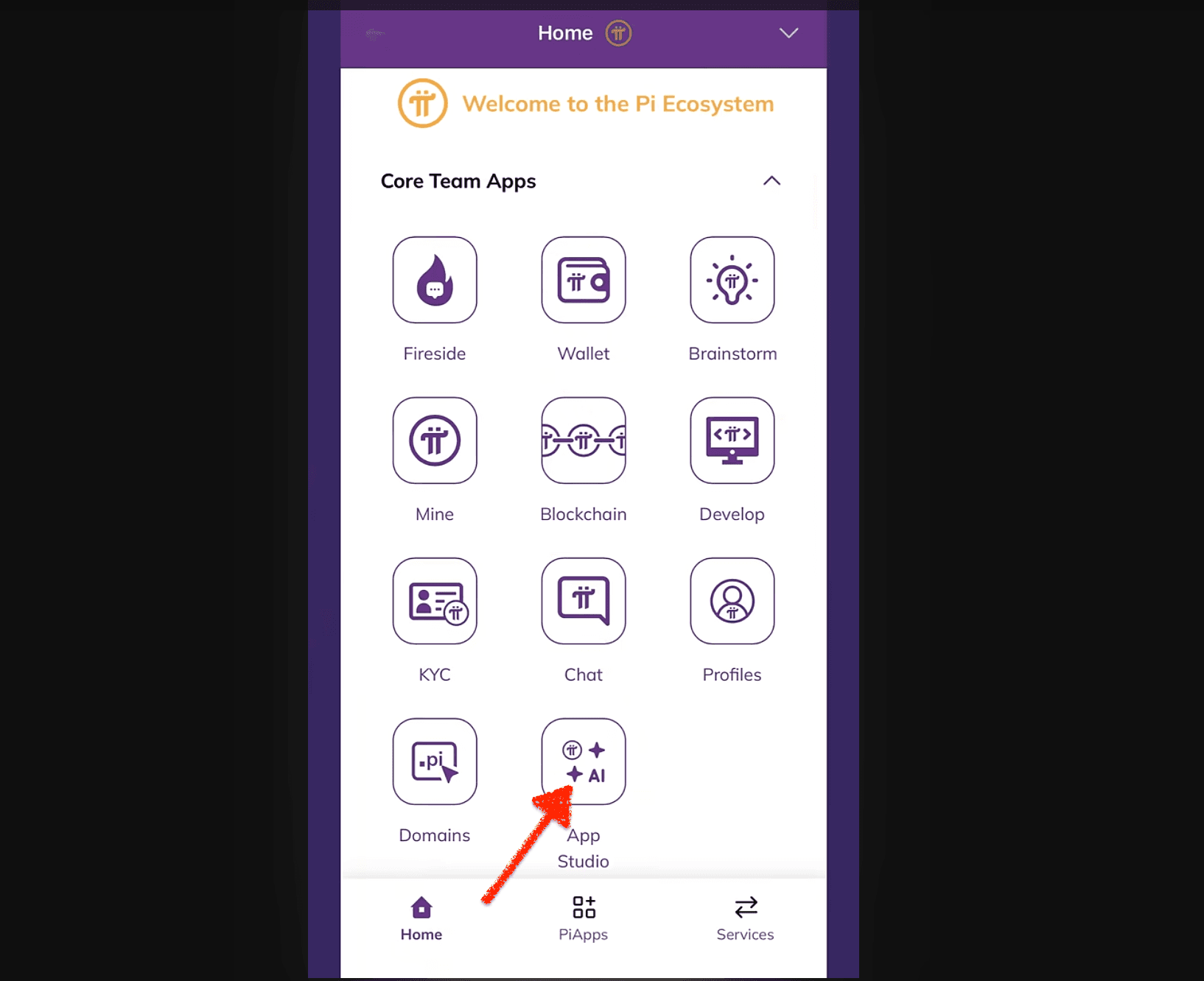
Step 1: Access Pi App Studio Through Pi Browser
Open the Pi Browser on mobile and navigate to Pi App Studio. The payment integration feature is not available in the Pi Desktop app.
Step 2: Create a New Custom App
Payments can only be integrated into newly created apps. Existing apps cannot retroactively add payments at this stage.
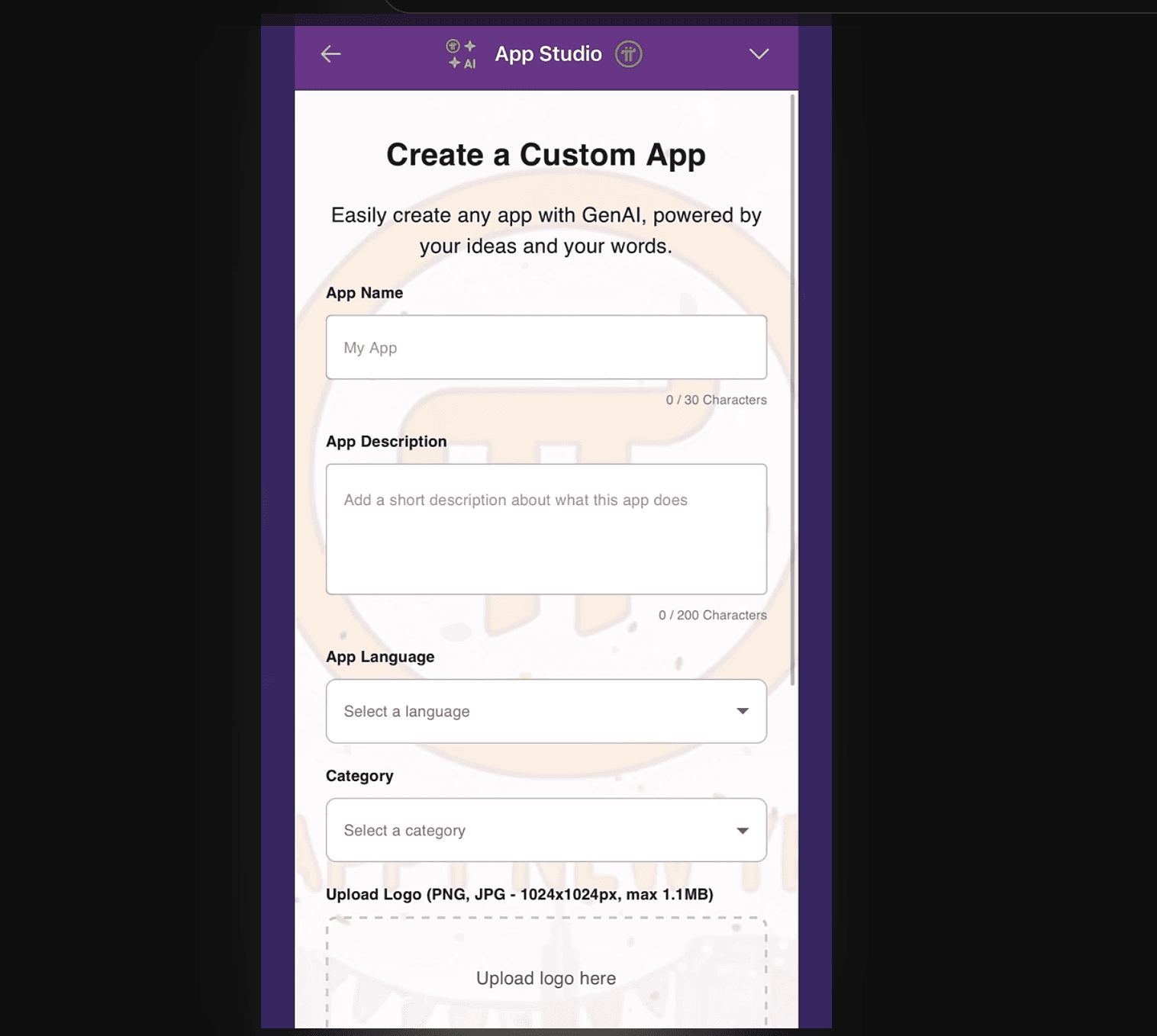
Choose Custom App when starting the creation process.
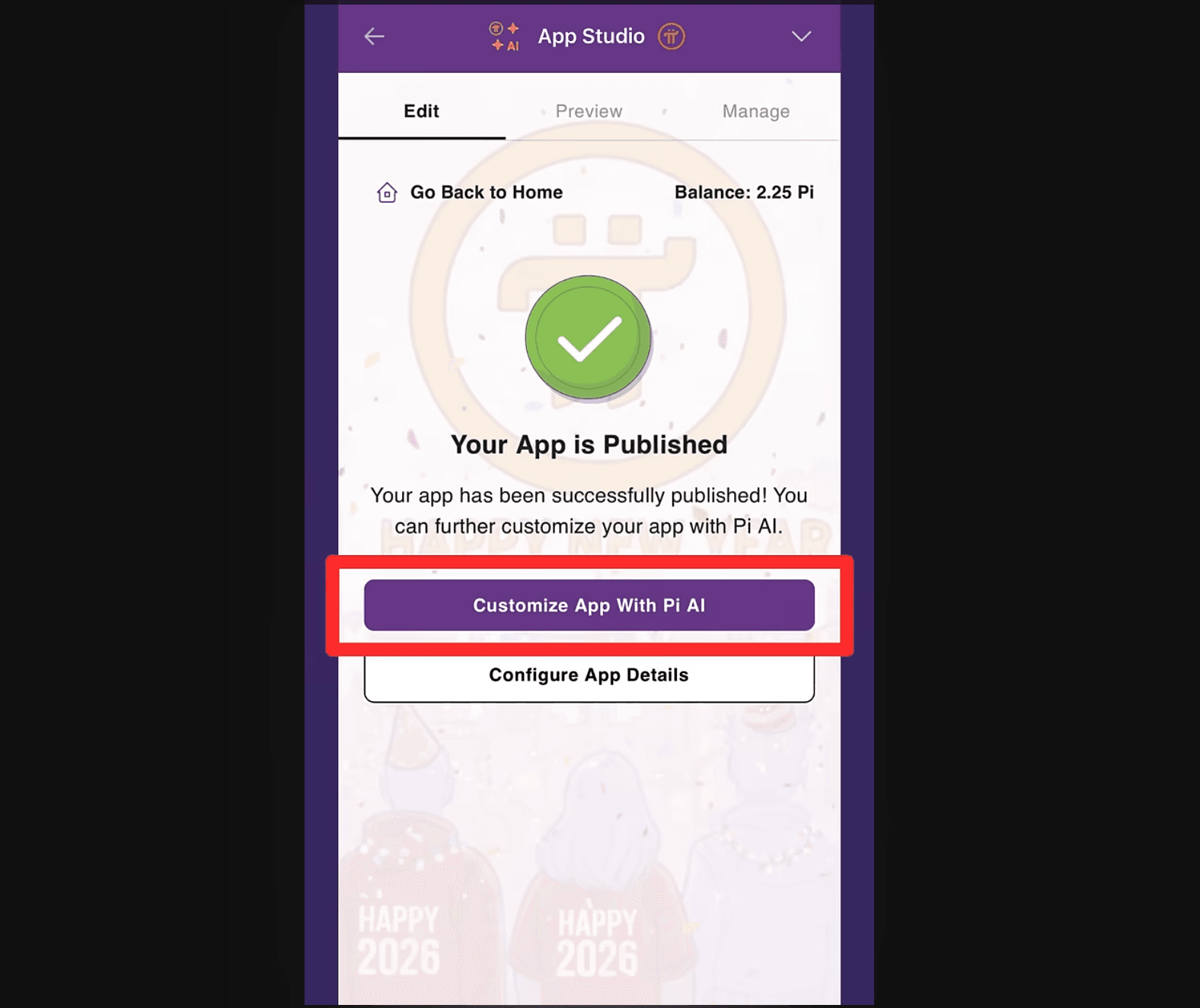
Step 3: Open the Pi AI Customization Dashboard
After creating the app, select Customize App With Pi AI. This opens the AI-driven editing interface that controls app behavior and features.
Step 4: Explicitly Mention Pi Payment in the Prompt
In your prompt, clearly state that you want to add Pi payment functionality. The system only activates payment workflows when the phrase "Pi payment" is explicitly included.
Example prompt intent
Add Pi payment so users can continue the game after losing
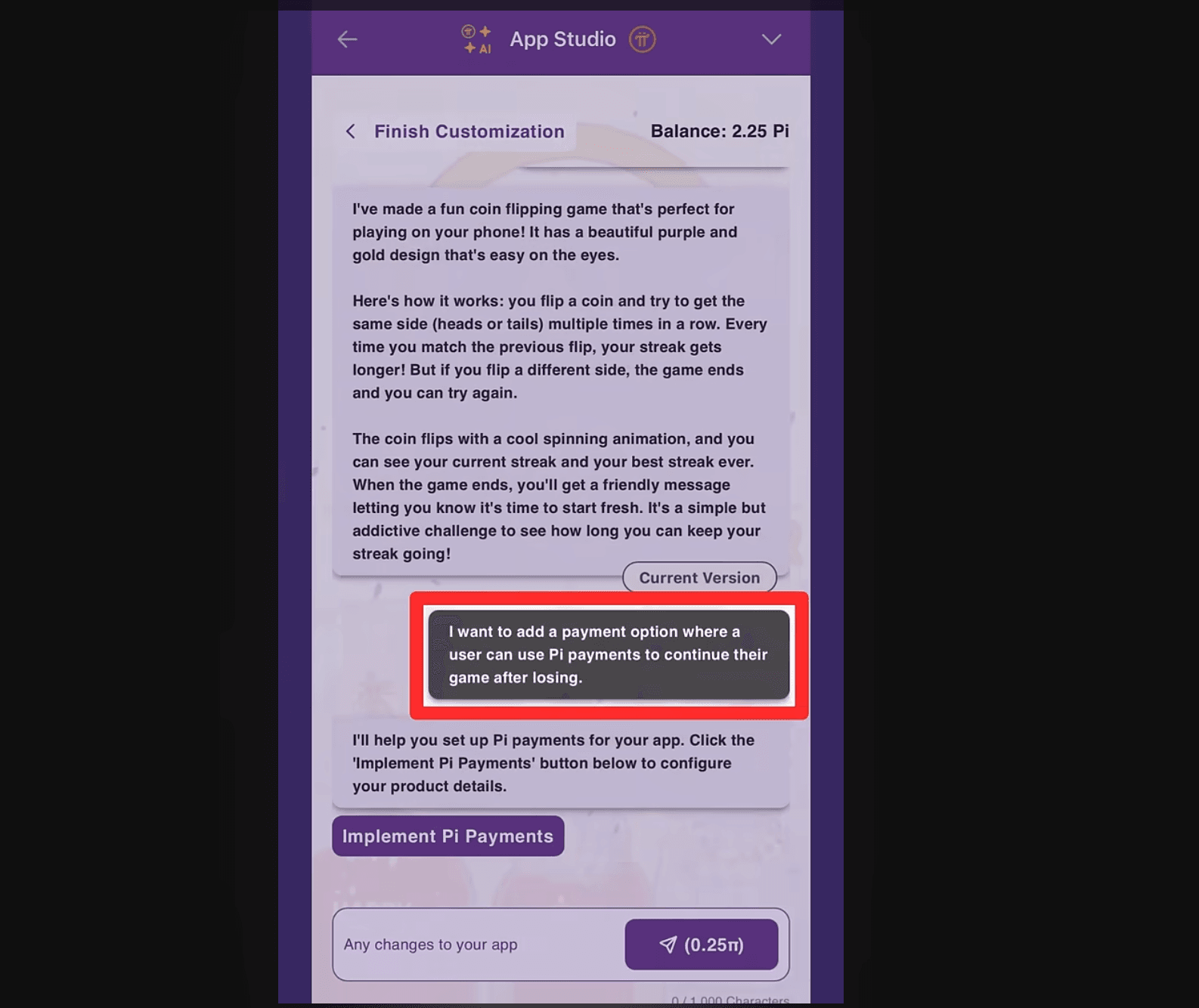
Step 5: Tap Implement Pi Payments
Once Pi payment is recognized in the prompt, an Implement Pi Payments button appears. Select it to continue.
Step 6: Create a Testnet Pi Wallet
You must create a new Testnet Pi wallet during setup. All Test Pi payments from users are sent to this wallet.
Important operational rules
• Save the private key securely
• Never share the private key
• Wallet creation is mandatory
Step 7: Define Payment Behavior Precisely
Describe exactly what the payment does inside the app. Precision matters.
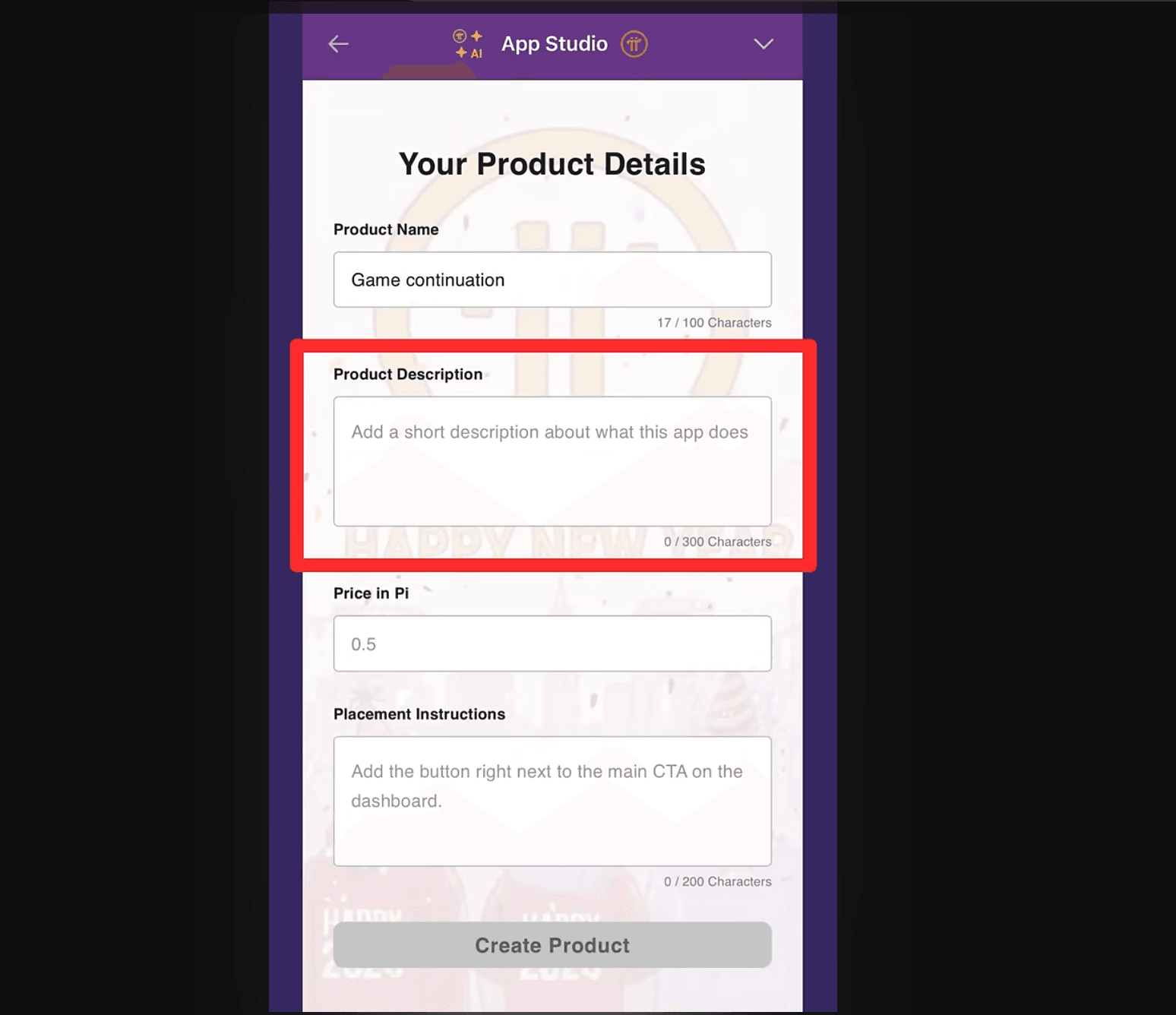
Include
• What action does the payment unlocks
• When it appears
• How it affects the session
Example
User pays Test Pi to continue the current game session after losing without resetting the score
Step 8: Set the Price in Pi
Define the payment amount in Pi per transaction. This is a fixed amount per interaction. (See Image above)
Step 9: Place the Payment Option
Specify where the payment option appears in the user interface. For example, after a game loss screen.
Step 10: Publish and Test
Once saved, users can interact with the payment feature using Test Pi. Revenue appears in the app revenue dashboard.
Example Coin Flipping Game Use Case
The official walkthrough demonstrates a simple coin-flipping game.
Initial behavior
• User flips a coin
• User tries to match consecutive outcomes
• Game ends in a loss
With payment integration
• After losing, the user is offered a Test Pi payment
• Payment allows continuation of the same session
• Score is preserved
This demonstrates how payments modify session logic without introducing persistent upgrades.
Revenue Tracking and Wallet Management
Creators can view Test Pi revenue through the App Studio revenue dashboard.
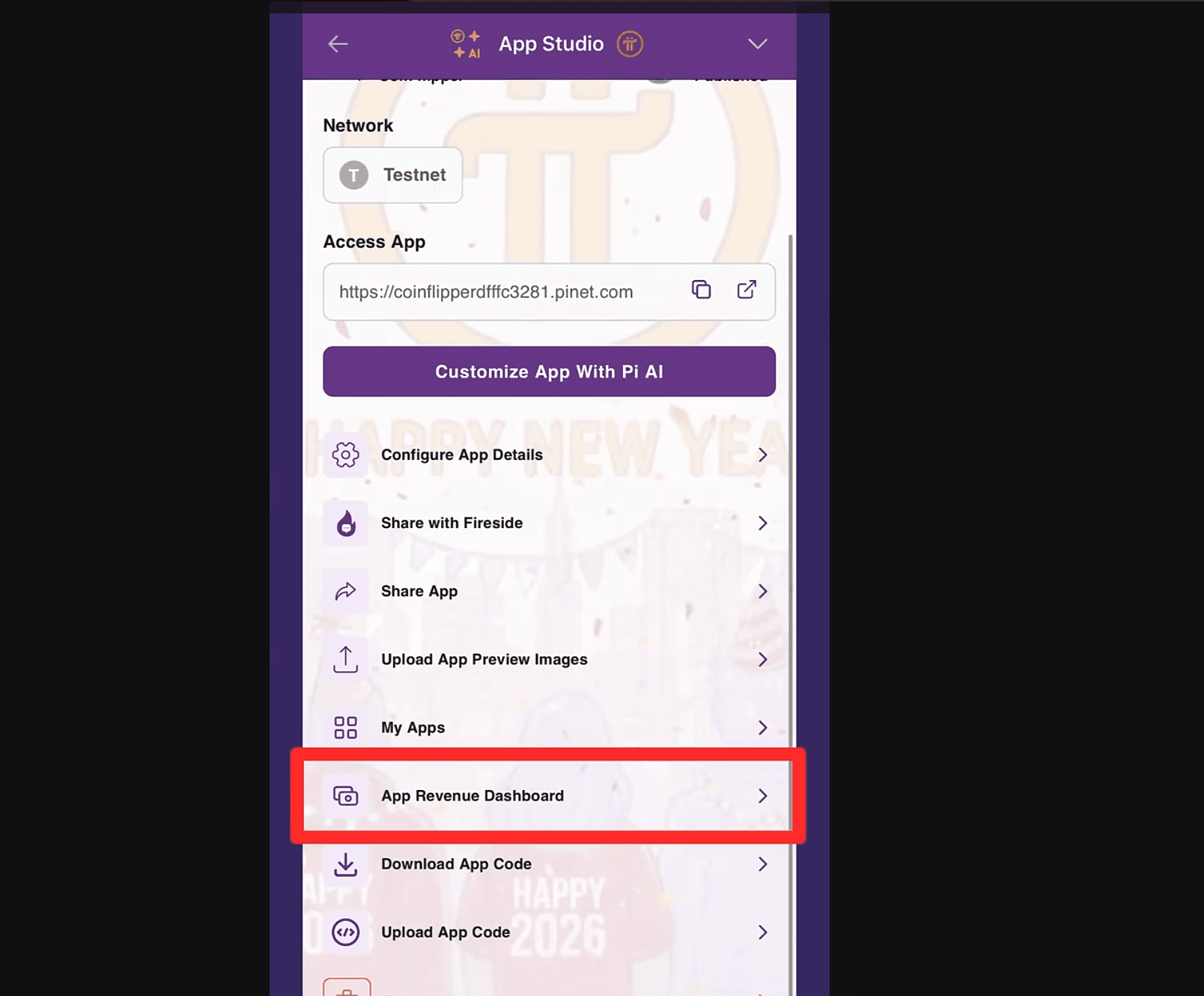
Current limitations
• Revenue is Test Pi only
• No Mainnet transfers
• No withdrawal to external wallets
Wallet security remains the responsibility of the creator. Pi App Studio does not manage private keys.
How This Changes App Creation Inside Pi Network
This update shifts monetization access from developers to creators.
Before
• Payment integration required SDKs
• Technical skills were mandatory
• Monetization favored developers
Now
• Payments are prompt-driven
• No code is required
• Monetization is creator accessible
This aligns with Pi Network’s utility-first approach by enabling more functional apps rather than speculative assets.
Conclusion
Pi App Studio payment integration introduces a controlled and simplified way for creators to add Pi-based payments into their apps during active sessions. By limiting functionality to Testnet and session-level interactions, Pi Network prioritizes stability and experimentation over premature monetization.
The system removes technical barriers while preserving wallet security and transparent payment flows. For creators, it offers a practical path to test monetization logic without code. For the ecosystem, it broadens participation in building utility-driven applications.
Source:
- Pi Payments Integration: YouTube Video
Read Next...





Frequently Asked Questions
Can existing Pi App Studio apps add payment integration
No. Payment integration currently works only for newly created apps.
Are payments persistent across sessions?
No. Payments apply only to the active session and reset when the session ends.
Is Mainnet Pi supported
No. All payments are currently processed using Test Pi on Testnet.
Disclaimer
Disclaimer: The views expressed in this article do not necessarily represent the views of BSCN. The information provided in this article is for educational and entertainment purposes only and should not be construed as investment advice, or advice of any kind. BSCN assumes no responsibility for any investment decisions made based on the information provided in this article. If you believe that the article should be amended, please reach out to the BSCN team by emailing [email protected].
Author
 UC Hope
UC holds a bachelor’s degree in Physics and has been a crypto researcher since 2020. UC was a professional writer before entering the cryptocurrency industry, but was drawn to blockchain technology by its high potential. UC has written for the likes of Cryptopolitan, as well as BSCN. He has a wide area of expertise, covering centralized and decentralized finance, as well as altcoins.
(Advertisement)
Latest News
5h : 7m ago

Report: Cardano's Biggest Updates from H1 2026
7h : 40m ago

What is an XDC Network Masternode Validator?
July 13, 2026

Telebiz Goes Live With an Open-Source CRM Built Directly Into Telegram
July 13, 2026

Will Robinhood Chain Push ETH's Price to All Time Highs?
July 13, 2026

What is BlackRock's BUIDL Fund on Avalanche AVAX?
July 10, 2026

How Do PancakeSwap's CAKE Token Burns Actually Work?
July 10, 2026

Report: Ripple & The XRP Ecosystem in H1 2026
July 10, 2026

How Is Cardano Advancing Financial Inclusion in Developing Countries?
(Advertisement)

Crypto Project & Token Reviews
Project & Token Reviews
Comprehensive reviews of crypto's most interesting projects and assets
Learn about the hottest projects & tokens

Latest Crypto Articles
Get up to date with the latest crypto news stories and events